In today’s competitive digital landscape, user experience isn’t just a marketing buzzword—it’s a direct ranking factor in Google’s algorithm. Since 2024, with the introduction of the Page Experience update, Google has incorporated experience-focused metrics into its ranking system. The most impactful among these are Core Web Vitals (CWV).
These metrics, derived from real-world user data (Field Data), have a direct influence on SEO rankings, bounce rate, conversion rate, and user satisfaction. Websites that load slowly, shift elements while rendering, or delay user interactions not only rank lower but also frustrate users, leading to lost traffic and sales.
Therefore, adopting a professional strategy to improve CWV has become a non-negotiable pillar of technical SEO. In this article, we’ll explore in detail what Core Web Vitals are, how to optimize them specifically for WordPress websites, which tools can assist you, and how an end-to-end optimization service works in practice.
What Are Core Web Vitals?
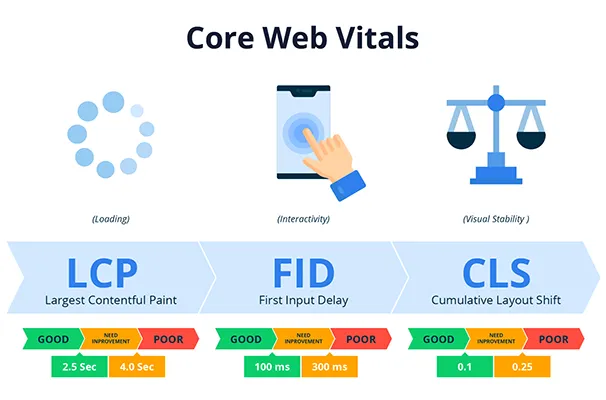
Core Web Vitals are a set of three key performance indicators defined by Google to measure the real user experience of a webpage:
1. Largest Contentful Paint (LCP)
Measures the time it takes for the largest visible element (like a hero image or main heading) to load on the screen.
Goal: Less than 2.5 seconds
2. Interaction to Next Paint (INP)
(Replaced First Input Delay – FID in March 2024)
Tracks the time between a user interaction (click, scroll, tap) and the next visual response.
Goal: Less than 200 milliseconds
3. Cumulative Layout Shift (CLS)
Evaluates unexpected layout shifts while the page loads—typically caused by images, fonts, or ads.
Goal: Less than 0.1
These metrics are collected using Real User Monitoring (RUM) data from Chrome users and give Google a strong signal about the true usability of your site.
A Comprehensive Overview
Core Web Vitals are a set of standardized performance metrics introduced by Google to measure and improve real-world user experience across websites. These metrics focus on three key aspects of user interaction: loading performance, interactivity, and visual stability. Rather than relying on simulated lab results alone, Core Web Vitals are grounded in actual user data (field data), gathered from Chrome UX Report (CrUX), and are now considered critical ranking signals in Google’s search algorithm.
Here’s a breakdown of the three key metrics that define Core Web Vitals:
1. Largest Contentful Paint (LCP)
This metric measures the time it takes for the largest visible element (such as a hero image, main headline, or featured block) to fully render in the viewport. A fast LCP is crucial because it indicates how quickly users can see and begin engaging with the main content.
Ideal benchmark: less than 2.5 seconds
2. Interaction to Next Paint (INP) (replacing FID from March 2024)
INP evaluates the time from when a user interacts (clicks, taps, types) to when the next frame is painted. It reflects how responsive your website feels during interaction. High INP values often point to JavaScript bottlenecks or server-side delays.
Ideal benchmark: less than 200 milliseconds
3. Cumulative Layout Shift (CLS)
CLS assesses the visual stability of a web page by measuring how often and how far elements move unexpectedly during loading. Sudden layout shifts—such as text jumping while images load or buttons moving under the user’s cursor—result in a poor user experience.
Ideal benchmark: less than 0.1
These three metrics are evaluated together as part of Google’s Page Experience signal, meaning if your site performs poorly in Core Web Vitals, it can directly affect your visibility in search engine results pages (SERPs), especially on mobile.
Core Web Vitals apply to every page on your website and are measured through tools such as PageSpeed Insights, Lighthouse, and Chrome’s DevTools. For WordPress websites—known for their heavy reliance on plugins, themes, and third-party scripts—optimizing Core Web Vitals is often a complex but essential task for maintaining user trust, reducing bounce rates, and improving conversions.
Improving How to Optimize Core Web Vitals on WordPress Sites
backend improvements, and smart use of caching and CDNs. Below is a detailed step-by-step guide to help you enhance each CWV metric efficiently:
🟢 Step 1: Audit Your Site with PageSpeed Tools
Start by analyzing your site using:
Google PageSpeed Insights
Web.dev
Lighthouse in Chrome DevTools
These tools provide both Field Data (real user metrics) and Lab Data (simulated load results), along with prioritized improvement suggestions.
🟢 Step 2: Improve Largest Contentful Paint (LCP)
To reduce LCP times:
Optimize and compress large images using formats like WebP or AVIF
Use lazy loading for images and iframes below the fold
Preload key resources such as fonts and hero images
Eliminate render-blocking resources like unused CSS and JavaScript
Implement caching strategies to deliver assets faster
🟢 Step 3: Optimize Interaction to Next Paint (INP)
INP reflects the site’s responsiveness. To improve it:
Defer or asynchronously load JavaScript files
Minimize main-thread blocking time by reducing heavy scripts
Avoid long tasks caused by third-party plugins or analytics
Leverage server-side caching and keep your WordPress core, themes, and plugins updated
🟢 Step 4: Reduce Cumulative Layout Shift (CLS)
To ensure visual stability:
Always define width and height attributes for images and embeds
Preload fonts to avoid layout jumping due to font swapping
Reserve space for ads, popups, and widgets
Use CSS aspect-ratio for containers with dynamic content
Avoid inserting content above existing elements without shifting them
🟢 Step 5: Backend and Servers-Level Optimization
Enable Gzip or Brotli compression through your hosting panel
Use a reliable CDN (such as Cloudflare or BunnyCDN) to deliver static assets quickly
Reduce TTFB (Time to First Byte) by improving PHP execution and database queries
Offload heavy assets (e.g., video) to external hosts when possible
Top Tools for Core Web Vitals Optimization
Whether you’re a developer or a site owner, these tools can help you monitor and optimize Core Web Vitals effectively:
1. Google PageSpeed Insights
Offers both lab and field data, detailed breakdowns of LCP, INP, CLS, and actionable tips. Ideal for quick audits and prioritizing tasks.
2. Chrome DevTools Performance Tab
Use it to view rendering performance, JavaScript execution timelines, and identify bottlenecks during user interaction phases.
3. Lighthouse
A comprehensive auditing tool built into Chrome that evaluates performance, accessibility, best practices, and SEO. It simulates loading and offers CWV-specific recommendations.
4. Web Vitals Chrome Extension
This browser extension gives real-time CWV feedback while browsing your site, useful for quick visual cues.
5. NitroPack / WP Rocket / FlyingPress
These premium WordPress optimization plugins offer:
Asset minification
Image lazy loading
Cache preloading
Font optimization
They are highly effective for improving LCP and INP without manual coding.
6. Cloudflare with APO (Automatic Platform Optimization)
Provides edge caching, early HTML rendering, and image compression—all of which dramatically improve LCP and TTFB scores.
Best Tools to Measure & Optimize Core Web Vitals
Here are some reliable tools for diagnosing and improving CWV performance:
Tool Purpose
Google PageSpeed Insights Provides detailed CWV score and lab/field data
Lighthouse (DevTools) Local audit with actionable insights
Chrome User Experience Report (CrUX) Aggregated real-user data
Web Vitals Chrome Extension Real-time in-browser tracking
NitroPack / WP Rocket Optimization plugins for caching, deferring scripts, etc.
Cloudflare CDN + APO Global delivery + automatic platform optimization
Why Your Business Needs This Service
Improved SEO: Websites that fail CWV audits may lose visibility on search engine results pages (SERPs).
Higher Conversions: Faster and more stable pages lead to better user engagement and lower bounce rates.
Google Compliance: Starting in 2025, Core Web Vitals will be even more tightly integrated into Google's ranking algorithm, especially for mobile.
Competitive Edge: If competitors aren’t optimizing, you gain an edge; if they are—you can’t afford to fall behind.
Data-Driven Scalability: Optimization ensures your infrastructure can handle growth without compromising UX.
📈 If your site is failing LCP, INP, or CLS benchmarks—or you're unsure where to start—contact Rackset’s Performance Optimization Team for a technical audit and actionable plan.
Your site deserves to load faster, interact better, and rank higher.
Frequently Asked Questions (FAQ)
1. Is this service only for WordPress websites?
Not at all. While the service is tailored for WordPress, it also applies to other platforms such as Laravel, custom HTML, or even headless CMS setups.
2. How is this different from using performance plugins?
Plugins apply general settings. This service provides a deep, tailored audit of your code, server configuration, external scripts, and real user metrics—far beyond plugin capabilities.
3. Are the optimization results permanent?
Mostly, yes. However, major changes to themes, plugins, or third-party assets may impact Core Web Vitals again. Ongoing monitoring is recommended for long-term stability.
4. What tools are used in this service?
We rely on PageSpeed Insights, Lighthouse, Chrome UX Report (CrUX), WebPageTest, GTmetrix, and SpeedCurve for accurate diagnostics and progress tracking.
5. How long does the optimization process take?
Typically, between 3 to 10 business days depending on the complexity, number of templates, plugins, and your current CWV score.
Benefits of Core Web Vitals Optimization
Improved Google rankings, especially on mobile devices
Reduced bounce rate and enhanced user satisfaction
Optimized real-world UX performance
Increased conversion rates
Higher PageSpeed and Lighthouse scores
Faster load times even under heavy traffic
Lower server resource usage and fewer render-blocking elements
Full compliance with Google’s Page Experience update
Before & After Comparison
| Metric | Before Optimization | After Optimization |
|---|---|---|
| Largest Contentful Paint (LCP) | 4.2s (Fail) | 1.8s (Pass ✅) |
| Interaction to Next Paint (INP) | 380ms | 110ms |
| Cumulative Layout Shift (CLS) | 0.34 | 0.04 |
| PageSpeed Score | 59/100 | 95/100 |
| Bounce Rate | 65% | 34% |
| SEO Mobile Rank | Below competitors | Top 3 in niche |
| Full Page Load Time | 6.5s | 2.1s |
If your website is flagged by Google as needing improvement or Poor on PageSpeed or Core Web Vitals, it’s time to act.
📞 Contact Rackset’s Performance Experts today and get a free consultation.
💡 Optimizing Core Web Vitals is not a luxury—it's a critical investment in your digital success.
Conclusion
In today’s competitive landscape, user experience is both a retention strategy and a ranking signal.
Core Web Vitals Optimization is not just a technical enhancement—it's a long-term UX and SEO strategy.
Whether you're running a high-traffic eCommerce site or a content-rich blog, optimizing your CWV can significantly improve speed, usability, and visibility.

Behzad Nategh is the Founder and CEO of Rackset, with 20+ years in web hosting, cloud infrastructure, and web design. He writes on hosting, domains, security, and growing an online business.
Leave a Reply