Introduction to Web Servers
When considering the best WordPress hosting service for your website, understanding web servers is crucial. A web server is a fundamental component for setting up a website and running an online business. It is essential to have a comprehensive understanding of different types of web servers to make an informed choice.
This article is part of Rackset’s Server guides — browse the rest of the category for more in-depth tutorials on this topic.
What is a Web Server?
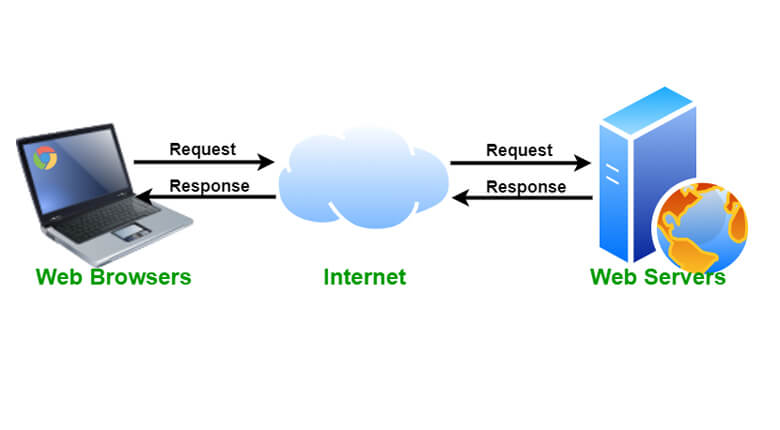
A web server is a powerful computer system that hosts websites and serves web pages to users upon request. It stores, processes, and delivers web pages using the HTTP (Hypertext Transfer Protocol), which is the foundation of data communication on the World Wide Web. The web server’s software plays a critical role in ensuring that content is delivered efficiently to end-users.
Key Functions of a Web Server
- Storage: Web servers store all the files necessary for a website, including HTML documents, images, CSS stylesheets, and JavaScript files.
- Processing Requests: When a user requests a web page, the web server processes the request and retrieves the required files.
- Content Delivery: After processing, the server delivers the requested content to the user’s browser, enabling the viewing of web pages.
- Security: Web servers often include security features to protect data and manage access to resources.
Types of Content Served
Web servers handle both static and dynamic content:
- Static Content: Includes files such as images, CSS stylesheets, and static HTML pages that do not change unless manually updated.
- Dynamic Content: Generated in real-time by server-side scripts and applications, often using languages like PHP, Python, or Ruby.
The Importance of Choosing the Right Web Server
Selecting the appropriate web server is crucial for optimal website performance. Different types of web servers offer various features and capabilities, making it essential to evaluate them based on your website’s specific needs and requirements. Whether you’re building your site from scratch or using a platform like WordPress, understanding web servers will guide you in making the best hosting decision.
How Web Servers Function
Web servers play a crucial role in delivering web pages to users. They function by processing incoming requests from clients and responding with the appropriate web content. This process involves several key steps and components, which ensure that users can access websites efficiently and reliably.
Request Handling
When a user wants to access a website, their browser sends an HTTP request to the web server. This request includes the URL of the desired web page and any additional data needed to process the request, such as cookies or authentication tokens.
Steps in Request Handling
- The user’s browser sends an HTTP request to the web server.
- The web server receives the request and examines the URL to determine which resource is being requested.
- If the requested resource is available, the server prepares the appropriate response.
- The server sends the HTTP response back to the user’s browser.
- The browser renders the content for the user to view.
Content Delivery
Web servers deliver both static and dynamic content. Static content includes images, CSS files, and HTML pages, which are stored in their final form on the server. Dynamic content is generated on-the-fly, often using server-side scripts or applications.
Static vs. Dynamic Content
| Content Type | Description | Example |
|---|---|---|
| Static Content | Pre-stored files that do not change unless manually updated. | Images, CSS files |
| Dynamic Content | Generated in real-time based on user interaction or other factors. | PHP scripts, database-driven pages |
Communication Protocols
Web servers primarily use the HTTP and HTTPS protocols to communicate with clients. These protocols define how messages are formatted and transmitted, ensuring secure and efficient data exchange.
HTTP vs. HTTPS
- HTTP: The basic protocol for transferring web pages and data.
- HTTPS: A secure version of HTTP that encrypts data for safe transmission.
Understanding how web servers function is essential for selecting the right web hosting service, especially when considering options like WordPress hosting. A well-configured web server ensures that your website can handle user requests efficiently and securely, providing a seamless experience for your visitors.
Key Features of Web Servers
Web servers are essential for hosting websites and ensuring the smooth delivery of web content to users. Understanding their key features helps in selecting the right server for your needs, whether you’re running a simple blog or a complex e-commerce platform. Here are some of the crucial features of web servers:
1. HTTP Protocol Support
Web servers must support the Hypertext Transfer Protocol (HTTP), which is the foundation of data communication on the World Wide Web. This protocol allows web servers to deliver content to users’ browsers efficiently.
2. Static and Dynamic Content Handling
Web servers are capable of serving both static and dynamic content. Static content includes images, CSS, and HTML files, while dynamic content is generated in real-time by server-side scripts like PHP or ASP.NET.
Read more: Installing Apache Web Server on Windows Server 2022
For projects that need guaranteed resources and full root control, a VPS is the right step up from shared hosting. With VPS hosting you get dedicated CPU/RAM, NVMe storage, a dedicated IP and high uptime, deployed in minutes.
3. Virtual Hosting
Virtual hosting enables a single web server to host multiple websites. This is crucial for web hosting services where multiple domains are managed on a single server, optimizing resource usage and reducing costs.
4. Load Balancing
Load balancing distributes incoming network traffic across multiple servers. This ensures no single server becomes overwhelmed, enhancing website reliability and performance.
5. Security Features
Security is paramount for any web server. Key security features include:
- SSL/TLS support for encrypted data transmission
- Firewall and intrusion detection systems
- Regular software updates and patches
6. Logging and Monitoring
Web servers provide logging and monitoring capabilities to track server performance, user activity, and potential security threats. This data is vital for maintaining server health and optimizing website performance.
7. Scalability
Scalability is the ability of a web server to handle increasing loads by adding more resources. This feature is essential for growing websites that experience variable traffic patterns.
8. Support for Multiple Programming Languages
Modern web servers support various programming languages such as PHP, Python, Ruby, and Java, allowing developers to use the language best suited for their application.
9. Caching Mechanisms
Caching improves server performance by storing frequently accessed data in memory, reducing the time needed to generate and deliver content to users.
10. Customization and Extensibility
Web servers often provide customization options and support for third-party modules or plugins, allowing administrators to extend server functionality according to their specific needs.
Choosing the Right Web Server
Selecting the appropriate web server is crucial for the performance, scalability, and security of your website. Whether you are setting up a new website or migrating an existing one, understanding the different types of web servers and their features will help you make an informed decision.
Factors to Consider
- Performance: Consider the server’s ability to handle traffic and deliver content quickly. This includes processing power, memory, and bandwidth.
- Compatibility: Ensure the server supports the technologies your website uses, such as PHP, Python, or Node.js.
- Scalability: Choose a server that can grow with your website, accommodating increasing traffic and data.
- Security: Look for built-in security features like firewalls, SSL support, and DDoS protection.
- Cost: Balance your budget with the server’s features and performance capabilities.
Types of Web Servers
Here is a brief overview of the most common types of web servers:
| Type | Description |
|---|---|
| Apache | Open-source and highly customizable, Apache is one of the most popular web servers, known for its reliability and support for various modules. |
| Nginx | Renowned for its performance and efficiency, Nginx is ideal for handling high traffic and static content. |
| LiteSpeed | Offers high performance and security, with features like HTTP/3 support and built-in caching. |
| Microsoft IIS | Integrated with Windows Server, IIS is suitable for websites that use Microsoft technologies. |
Practical Example: WordPress Hosting
For WordPress websites, both Apache and Nginx are popular choices due to their compatibility and performance. Here’s a basic configuration example for Nginx:
server {
    listen 80;
    server_name example.com;
    root /var/www/html;

    index index.php index.html index.htm;

    location / {
        try_files $uri $uri/ /index.php?$args;
    }

    location ~ .php$ {
        include snippets/fastcgi-php.conf;
        fastcgi_pass unix:/var/run/php/php7.4-fpm.sock;
    }

    location ~ /.ht {
        deny all;
    }
}
By considering these factors and understanding the capabilities of different web servers, you can choose the best server to meet your website’s specific needs.
Read more: Litespeed vs Nginx vs Apache – Which Is Best Web Server?
Every website needs stable, fast hosting to stay online. Rackset’s web hosting runs on NVMe storage with high uptime and 24/7 support, giving your site a reliable foundation.
Apache Web Server Overview
The Apache Web Server, officially known as the Apache HTTP Server, is one of the most widely used web server software systems in the world. It was developed and is maintained by the Apache Software Foundation. Apache has been a popular choice for hosting websites due to its open-source nature, flexibility, and robust community support.
Key Features of Apache
- Open Source: Apache is free to use, modify, and distribute, making it an attractive option for both small businesses and large enterprises.
- Cross-Platform: It can run on various operating systems, including Linux, Windows, and macOS, providing flexibility in deployment.
- Module-Based Architecture: Apache’s functionality can be extended through a wide range of modules, allowing for customization and additional features like security enhancements, URL rewriting, and more.
- Security: Apache offers robust security features and regular updates to protect against vulnerabilities. It supports SSL/TLS for secure data transmission.
- Virtual Hosting: Apache can host multiple websites on a single server, each with its own domain name and configuration.
Common Use Cases
Apache is versatile and can be used in various scenarios:
- WordPress Hosting: Apache is often used as the web server for WordPress sites, thanks to its compatibility and ease of configuration with PHP and MySQL.
- Static and Dynamic Content Serving: It efficiently serves both static files (like HTML and images) and dynamic content generated by server-side scripts.
- Development and Testing: Apache is commonly used in development environments to test web applications before deployment.
Basic Apache Configuration
Apache configuration is managed through text files, typically named httpd.conf or apache2.conf, depending on the operating system. Here is a simple example of a basic configuration:
    ServerAdmin webmaster@example.com
    DocumentRoot "/var/www/html"
    ServerName www.example.com
    ErrorLog ${APACHE_LOG_DIR}/error.log
    CustomLog ${APACHE_LOG_DIR}/access.log combined
Conclusion
The Apache Web Server remains a cornerstone of web hosting due to its reliability, flexibility, and comprehensive support for a wide range of applications. Understanding its features and capabilities is crucial for making informed decisions when selecting a web server for your hosting needs.
IIS Web Server Overview
Internet Information Services (IIS) is a flexible, secure, and manageable web server developed by Microsoft for Windows Server. It provides a robust platform for hosting websites and web applications, making it a popular choice for businesses that rely on Windows-based environments.
Key Features of IIS
- Integration with Windows: IIS is tightly integrated with Windows Server, offering seamless management and security features that leverage the Windows operating system.
- Scalability: IIS supports a wide range of applications, from small websites to large-scale applications, and can efficiently handle significant traffic loads.
- Security: With built-in security features such as authentication, authorization, and SSL support, IIS ensures secure data transmission and access control.
- Extensibility: IIS supports modules and extensions, allowing developers to customize and enhance its functionality to meet specific needs.
- Application Pooling: IIS uses application pools to isolate different applications, improving reliability and security by preventing one application from affecting others.
Common Use Cases for IIS
IIS is commonly used in scenarios where integration with Windows technologies is beneficial. It is ideal for hosting:
- ASP.NET applications
- Websites requiring Active Directory integration
- Enterprise applications that leverage Microsoft technologies
Basic IIS Configuration
Configuring IIS involves several steps, including setting up websites, managing application pools, and configuring security settings. Below is a basic command to start and stop IIS services:
# To start the IIS service
net start w3svc

# To stop the IIS service
net stop w3svc
Managing IIS via the GUI
IIS can also be managed through its graphical user interface, which provides tools for configuring websites, monitoring performance, and setting security policies. The GUI allows administrators to:
- Create and manage websites and virtual directories.
- Configure application pools and worker processes.
- Set up security settings, including SSL certificates and authentication methods.
- Monitor server performance and troubleshoot issues.
In conclusion, IIS is a powerful web server option for those using Windows Server environments, offering a range of features that cater to different hosting needs, from simple websites to complex web applications.
Nginx Web Server Overview
Nginx (pronounced “engine-x”) is a high-performance web server renowned for its stability, rich feature set, simple configuration, and low resource consumption. It was created by Igor Sysoev and first released in 2004, primarily to address the C10k problem, which involves handling 10,000 simultaneous client connections. Over the years, Nginx has evolved into a versatile server that can manage a wide range of server roles, including acting as a reverse proxy, load balancer, mail proxy, and HTTP cache.
Key Features of Nginx
- High Concurrency: Nginx is designed to efficiently handle a large number of simultaneous connections, making it ideal for high-traffic websites.
- Load Balancing: Nginx can distribute client requests across multiple servers, enhancing performance and reliability.
- Reverse Proxy: It acts as an intermediary server, forwarding client requests to other servers, which aids in load distribution and security enhancement.
- Static and Dynamic Content Handling: Efficiently serves static content like images and can proxy requests for dynamic content to other servers.
- HTTP/2 and SSL/TLS Support: Offers modern protocol support for enhanced security and performance.
- Simple Configuration: Nginx configuration is straightforward, allowing for easy setup and maintenance.
Common Use Cases
Nginx is widely used in various scenarios, including:
Read more: Understanding Mail Servers and Their Types
- Web Hosting: Ideal for hosting websites, especially those using WordPress, due to its ability to efficiently handle high traffic.
- Content Delivery Networks (CDNs): Nginx’s caching capabilities make it suitable for CDNs, which require rapid content delivery.
- Microservices Architecture: Its reverse proxy and load balancing features make it a popular choice in microservices environments.
Basic Nginx Configuration Example
Below is a simple example of an Nginx configuration file:
For heavy workloads and maximum performance, a dedicated bare-metal server gives you an entire physical machine. Rackset’s dedicated server deliver full hardware, root access and configurable port speeds for the most demanding sites and apps.
server {
    listen 80;
    server_name example.com www.example.com;

    location / {
        proxy_pass http://localhost:8080;
        proxy_set_header Host $host;
        proxy_set_header X-Real-IP $remote_addr;
        proxy_set_header X-Forwarded-For $proxy_add_x_forwarded_for;
    }

    location /static/ {
        alias /var/www/static/;
    }
}
In this configuration, Nginx listens on port 80 for requests to example.com and proxies them to a local server running on port 8080. Static files are served directly from the /var/www/static/ directory.
Overall, Nginx is a powerful tool for web hosting, capable of handling a wide array of tasks with efficiency and reliability.
Other Popular Web Servers
When selecting a web server for your website, especially if you’re considering WordPress hosting services, it’s essential to understand the various options available. Here are some other popular web servers that are widely used across different hosting environments:
Apache HTTP Server
Apache is one of the oldest and most reliable web servers available. It is open-source and supports a wide range of features through extensions and modules. Apache is known for its flexibility and is compatible with both Linux and Windows servers.
- Highly customizable with modules
- Supports .htaccess for directory-level configuration
- Can handle a large number of concurrent connections
Nginx
Nginx is a high-performance web server known for its ability to handle many simultaneous connections. It is often used as a reverse proxy and load balancer, making it a popular choice for high-traffic websites.
- Efficient handling of static content
- Low memory usage and high concurrency
- Built-in load balancing and reverse proxy capabilities
LiteSpeed
LiteSpeed is a commercial web server that offers high performance and security features. It is compatible with Apache configurations, making it easy to switch from Apache to LiteSpeed without significant changes.
- Improved PHP performance with LSAPI
- Advanced cache management
- Integrated security features like DDoS protection
Microsoft Internet Information Services (IIS)
Developed by Microsoft, IIS is a web server specifically designed for Windows servers. It integrates seamlessly with other Microsoft products and offers robust support for ASP.NET applications.
- Easy integration with Microsoft technologies
- Supports HTTP/2 and FTP
- Comprehensive logging and diagnostics
Node.js
While not a traditional web server, Node.js can be used to create highly scalable web applications. It uses an event-driven, non-blocking I/O model, which makes it efficient and lightweight.
- Ideal for real-time applications
- JavaScript-based, allowing for full-stack development
- Rich ecosystem of libraries and tools
Each of these web servers has its strengths and use cases. Depending on your specific needs, such as the type of content you serve or the expected traffic, you can choose the most suitable web server for your WordPress hosting or other web applications.
Boost Your Web Server Performance
Discover how Rackset’s VPS hosting elevates your web server capabilities with unmatched speed and reliability. Our tailored solutions ensure your online presence is seamless and efficient.
Empower your website with Rackset.
Conclusion
Understanding web servers is crucial for anyone involved in web development or online business operations. These servers are the backbone of web hosting, responsible for processing requests, serving content, and ensuring seamless connectivity between users and the websites they wish to access. By familiarizing yourself with the different types of web servers, such as Apache, Nginx, and Microsoft IIS, you can make informed decisions about which server best suits your specific needs, whether you require high performance, scalability, or enhanced security features.
As you delve deeper into the world of web servers, consider how Rackset can support your hosting needs with its robust infrastructure and wide range of services. Whether you are looking to host a small personal blog or a large-scale e-commerce platform, Rackset offers scalable solutions tailored to your requirements. Explore our hosting plans today and take the next step in optimizing your web presence.
Frequently Asked Questions
What is a web server?
A web server is a software or hardware that stores, processes, and delivers web pages to users. It uses HTTP to communicate with clients, typically web browsers, to serve content such as HTML pages, images, and scripts.
What are the main functions of a web server?
The main functions of a web server include hosting websites, managing HTTP requests, storing website files, and ensuring secure and reliable access to web content. It also handles incoming requests from clients and delivers the corresponding resources.
What types of web servers are commonly used?
Common types of web servers include Apache, Nginx, Microsoft IIS, and LiteSpeed. Each has its own features and performance characteristics, catering to different hosting needs and environments.
How does a web server handle requests?
A web server handles requests by listening on a specific port (usually port 80 for HTTP or 443 for HTTPS), receiving requests from clients, processing them, and sending back the requested resources. It uses protocols like HTTP/HTTPS to facilitate this communication.
What is the difference between static and dynamic web servers?
Static web servers deliver fixed content that doesn’t change for each user, while dynamic web servers generate content on-the-fly based on user interactions or data inputs. Dynamic servers often use scripting languages and databases to create personalized responses.

Behzad Nategh is the Founder and CEO of Rackset, with 20+ years in web hosting, cloud infrastructure, and web design. He writes on hosting, domains, security, and growing an online business.
Leave a Reply