Introduction to Shared Hosting
For those looking to set up their own website or run an online business, shared hosting is a popular option. In shared hosting, your website will have its own storage and cPanel on a server shared by several accounts. Let’s explore what shared hosting is, how it works, and whether it’s the right choice for you.
This article is part of Rackset’s Hosting guides — browse the rest of the category for more in-depth tutorials on this topic.
Shared Hosting Definition
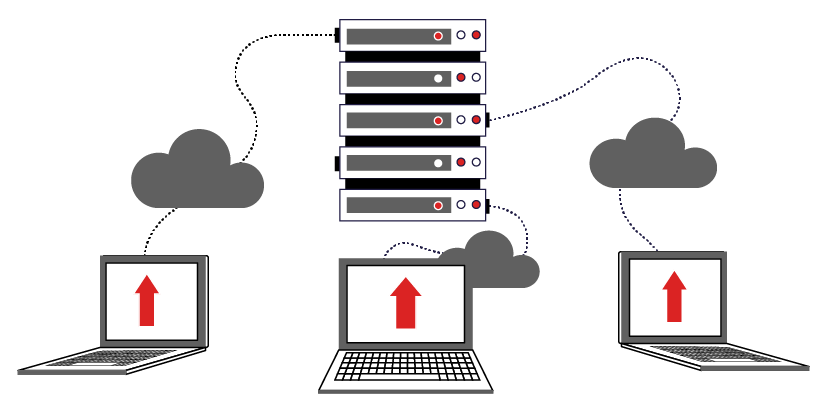
Shared hosting is a type of web hosting service where multiple websites reside on a single server. Each website has its own partition, which includes its own file storage space and resources, but shares the server’s overall resources such as CPU and RAM with other accounts. This setup is similar to renting an apartment, where you share the building (server) with other tenants but have your own personal space or apartment (website).
What Does Shared Hosting Offer?
Shared hosting offers several benefits that make it an attractive option for many users:
- Cost-Effective: Shared hosting is generally the most affordable hosting option, making it ideal for beginners and small businesses.
- Ease of Use: With a user-friendly control panel like cPanel, managing your website becomes straightforward, even for those without technical expertise.
- Maintenance: The hosting provider manages server maintenance, including software updates and security patches, allowing you to focus on your website.
Comparing Different Types of Shared Hosting Plans
Shared hosting plans can vary greatly depending on the hosting provider. Here are some common factors to consider:
| Feature | Basic Plan | Advanced Plan |
|---|---|---|
| Storage | 10 GB | 50 GB |
| Bandwidth | Unmetered | Unmetered |
| Email Accounts | 5 | Unlimited |
Should You Start with Shared Hosting?
For many individuals and small businesses, starting with shared hosting is a practical decision. It provides a cost-effective and easy-to-manage solution for hosting a website without requiring extensive technical knowledge. However, as your website grows, you may need to consider upgrading to more robust hosting solutions.
How Shared Hosting Works
Shared hosting functions by allowing multiple websites to reside on a single physical server. This server is divided into separate accounts, each with its own allocated resources such as storage space, bandwidth, and a control panel, typically cPanel. This setup is similar to living in an apartment complex where each tenant has their own apartment but shares the building’s overall infrastructure.
Server Resource Allocation
In shared hosting, the server’s resources are distributed among all the accounts hosted on it. These resources include:
- CPU: The central processing unit handles the execution of scripts and processes for all websites on the server.
- RAM: Random Access Memory is used to store data temporarily while tasks are being executed.
- Disk Space: Each account receives a specified amount of storage for website files, databases, and emails.
- Bandwidth: This refers to the amount of data that can be transferred to and from the server, affecting how much traffic your site can handle.
Shared Hosting Environment
The shared hosting environment is managed by the hosting provider. This includes:
- Server Maintenance: The provider handles hardware upkeep, software updates, and security patches.
- Technical Support: Most shared hosting plans include customer support to assist with any issues.
- Security Measures: Basic security measures like firewalls and monitoring are implemented to protect all accounts on the server.
Control Panel Access
Each user in a shared hosting setup has access to a control panel, typically cPanel, which allows them to manage their website. Through this interface, users can:
- Create and manage email accounts associated with their domain.
- Install applications such as WordPress or Joomla.
- Monitor resource usage and traffic statistics.
- Manage databases and file uploads.
Example of cPanel Access
# Accessing cPanel
1. Go to your hosting provider's website.
2. Log in to your account.
3. Navigate to the cPanel section.
4. Use the dashboard to manage your website settings.
Overall, shared hosting is an economical and user-friendly option for individuals and small businesses looking to establish an online presence without the need for extensive technical knowledge or large budgets.
Key Features of Shared Hosting
Cost-Effectiveness
One of the most appealing aspects of shared hosting is its affordability. Since multiple websites share the resources of a single server, the cost is divided among all users, making it a budget-friendly option for small businesses and personal websites.
User-Friendly Control Panel
Shared hosting typically includes an easy-to-use control panel, such as cPanel, which allows users to manage their websites, domains, email accounts, and databases without needing advanced technical skills.
Read more: Running a Website on Shared Hosting? Here’s How to Optimize Resource Usage
Every website needs stable, fast hosting to stay online. Rackset’s web hosting runs on NVMe storage with high uptime and 24/7 support, giving your site a reliable foundation.
Resource Allocation
In shared hosting, server resources such as CPU, RAM, and disk space are distributed among all hosted websites. While this means that your website will have limited resources compared to dedicated hosting, it is sufficient for small to medium-sized websites with moderate traffic.
Security Features
Shared hosting providers often implement robust security measures to protect all websites on the server. Features may include:
- Regular software updates and patches
- Firewalls and intrusion detection systems
- SSL certificates for secure data transmission
Technical Support
Most shared hosting plans come with 24/7 technical support, providing assistance with server-related issues and ensuring that your website remains operational. This support is crucial for users who may not have extensive technical expertise.
Scalability
Shared hosting plans often offer the flexibility to upgrade to higher-tier plans as your website grows. This scalability ensures that your hosting solution can evolve with your needs, allowing for increased storage, bandwidth, and other resources.
Pre-Installed Applications
Many shared hosting providers offer one-click installations of popular content management systems (CMS) like WordPress, Joomla, and Drupal. This feature simplifies the process of setting up and managing a website.
Email Hosting
Shared hosting plans typically include email hosting, allowing you to create professional email addresses associated with your domain name. This feature is essential for businesses looking to maintain a professional online presence.
Advantages of Shared Hosting
Shared hosting offers several benefits that make it an attractive option for individuals and small businesses looking to establish an online presence. Here are some of the key advantages:
Cost-Effectiveness
One of the most significant advantages of shared hosting is its affordability. Since server resources are shared among multiple users, the cost of maintaining the server is distributed, making it one of the most budget-friendly hosting options available. This makes shared hosting an ideal choice for startups and small businesses with limited budgets.
User-Friendly Management
Shared hosting plans typically come with user-friendly control panels like cPanel, which simplify the management of your website. These control panels provide easy access to essential features such as file management, email accounts, and database administration, enabling even those with limited technical skills to manage their websites effectively.
Maintenance and Support
With shared hosting, server maintenance and management are handled by the hosting provider. This means that tasks such as software updates, security patches, and server monitoring are taken care of, allowing you to focus on your website without worrying about the technical aspects of server management. Additionally, most shared hosting providers offer customer support to assist with any issues that may arise.
Scalability
While shared hosting is designed for smaller websites, many providers offer scalable plans that allow you to upgrade your resources as your website grows. This flexibility ensures that you can start small and expand as needed without the hassle of migrating to a different hosting solution.
Read more: Cloud vs Shared vs Dedicated Hosting – Which Is Better?
Pre-Installed Features
Shared hosting often comes with a variety of pre-installed features and applications, such as website builders, content management systems (CMS) like WordPress, and various plugins. These tools can help you quickly and easily set up and customize your website to suit your needs.
When you need to scale on demand, cloud hosting spreads your site across redundant infrastructure for better uptime and performance during traffic spikes.
- Affordability: Cost is shared among users.
- Ease of Use: Intuitive control panels like cPanel.
- Provider Maintenance: Server upkeep handled by the provider.
- Scalable Options: Upgrade resources as needed.
- Feature-Rich: Access to website builders and CMS.
Limitations of Shared Hosting
While shared hosting is a popular and cost-effective solution for many website owners, it comes with certain limitations that may impact the performance and scalability of your online presence. Understanding these limitations is crucial for making an informed decision about whether shared hosting is the right choice for your needs.
Performance Constraints
In a shared hosting environment, multiple websites are hosted on a single server. This means that the server’s resources, such as CPU, RAM, and bandwidth, are distributed among all the accounts on that server. As a result, your website’s performance can be affected by the activities of other websites sharing the same server.
- Limited Resources: If another website experiences a traffic spike, it can consume a significant portion of the server’s resources, potentially slowing down your site.
- Server Load: High server load can lead to slower page load times, affecting user experience and search engine rankings.
Security Concerns
Shared hosting can pose security risks due to the shared nature of the server.
- Shared IP Address: All websites on a shared hosting server typically share the same IP address. If one site engages in malicious activities, it can lead to IP blacklisting, affecting all sites on the server.
- Vulnerability Exposure: A security breach on one website can potentially expose vulnerabilities to others on the same server.
Limited Customization and Control
Shared hosting often comes with restrictions on the level of customization and control you have over the server environment.
- Software Limitations: Users are generally unable to install custom software or modify server settings, which can be restrictive for advanced users.
- Resource Allocation: You cannot fine-tune the server’s resource allocation to suit your specific needs.
Scalability Issues
Shared hosting is best suited for small to medium-sized websites with moderate traffic. As your website grows, you may encounter scalability issues.
- Traffic Limitations: High-traffic websites may exceed the resource limits of shared hosting, leading to performance degradation.
- Upgrade Path: Transitioning to a more robust hosting solution, like VPS or dedicated hosting, may require time and effort.
Choosing the Right Shared Hosting Plan
When selecting a shared hosting plan, it’s essential to consider your website’s current and future needs. Shared hosting is an economical solution for individuals and small businesses, but not all plans are created equal. Here are some factors to keep in mind:
Assess Your Website’s Requirements
Before choosing a plan, evaluate the following aspects of your website:
- Traffic Expectations: Estimate the number of visitors your website will receive. If you anticipate high traffic, ensure the plan can accommodate it without performance issues.
- Storage Needs: Consider the amount of data you will store, including images, videos, and databases. Choose a plan with sufficient disk space.
- Bandwidth: Ensure the plan offers enough bandwidth to handle your site’s data transfer needs, especially if you expect rapid growth.
- Number of Domains: Some plans allow hosting multiple domains, which can be beneficial if you plan to manage several websites.
Compare Features and Add-Ons
Different shared hosting plans come with various features and add-ons. Compare these offerings to find the best fit for your needs:
- Control Panel: A user-friendly control panel, like cPanel, simplifies website management tasks.
- Email Accounts: Check the number of email accounts you can create and any associated limitations.
- SSL Certificates: Some plans include free SSL certificates, which are crucial for securing your website.
- Backup and Security: Ensure the plan offers regular backups and robust security features to protect your data.
Evaluate Hosting Provider’s Reputation
The hosting provider’s reputation is crucial for reliable service:
- Uptime Guarantee: Look for providers that offer at least a 99.9% uptime guarantee to ensure your website remains accessible.
- Customer Support: Opt for providers that offer 24/7 customer support through multiple channels, such as live chat, phone, and email.
- Reviews and Testimonials: Read reviews and testimonials from other users to gauge the provider’s reliability and customer satisfaction.
Pricing and Contract Terms
Finally, consider the cost and contract terms:
Read more: Reseller Hosting vs Shared Hosting – What Are the Differences?
- Introductory Rates vs. Renewal Rates: Be aware of promotional pricing that may increase upon renewal.
- Contract Length: Shorter contracts offer more flexibility, while longer contracts may come with discounts.
By carefully evaluating these factors, you can choose a shared hosting plan that aligns with your needs and ensures a smooth, cost-effective online presence.
For projects that need guaranteed resources and full root control, a VPS is the right step up from shared hosting. With VPS hosting you get dedicated CPU/RAM, NVMe storage, a dedicated IP and high uptime, deployed in minutes.
Additional Services and Add-Ons
Shared hosting plans often come with a variety of additional services and add-ons that can enhance your website’s functionality and performance. These services can be particularly beneficial for those new to website management or those who want to expand their site’s capabilities without upgrading to a more expensive hosting plan.
Common Add-Ons
- SSL Certificates: Many shared hosting providers offer free or paid SSL certificates to secure your website and protect sensitive information.
- Domain Registration: Some hosting plans include free domain registration for the first year, making it easier to get started.
- Website Builders: Integrated website builders can help you design and launch your site quickly without needing advanced coding skills.
- Email Hosting: Shared hosting often includes email hosting, allowing you to create professional email addresses using your domain name.
- One-Click Installations: Many providers offer one-click installations for popular CMS platforms like WordPress, Joomla, and Drupal, simplifying the setup process.
Security and Performance Enhancements
To ensure your website remains secure and performs optimally, consider the following enhancements:
- Automated Backups: Regular backups protect your data and can be crucial in case of data loss or corruption.
- Security Tools: Add-ons like malware scanning and removal services can help keep your website safe from threats.
- Content Delivery Networks (CDN): CDNs can improve your website’s loading speed by distributing content across multiple servers globally.
Technical Support and Customer Service
While shared hosting plans generally include basic support, some providers offer premium support options as an add-on. These can include:
- Priority Support: Faster response times and dedicated support channels for urgent issues.
- Managed Services: Additional technical management services, such as server monitoring and maintenance, to ensure smooth operation.
When selecting a shared hosting plan, consider which add-ons and services are most important for your website’s needs. These additional features can provide significant value and enhance your site’s performance and security without breaking the bank.
Support and Maintenance in Shared Hosting
Support and maintenance are critical aspects to consider when choosing shared hosting. Since shared hosting involves multiple websites residing on a single server, the hosting provider typically manages most of the server maintenance tasks. This management includes server updates, security patches, and ensuring the server’s overall health and performance.
Support Services
Shared hosting plans often come with a range of support services. Here are some common features:
- 24/7 Customer Support: Most shared hosting providers offer round-the-clock support through various channels such as live chat, email, and phone.
- Knowledge Base: A comprehensive knowledge base or support center where users can find tutorials, FAQs, and guides to troubleshoot common issues.
- Community Forums: Some providers offer forums where users can interact with each other, share experiences, and find solutions to common problems.
Maintenance Responsibilities
In shared hosting, the hosting provider is responsible for most of the server maintenance tasks. This arrangement can be beneficial for users who lack technical expertise. Key maintenance activities include:
- Software Updates: Regular updates to server software and control panel tools, ensuring compatibility and security.
- Security Management: Implementing firewalls, malware scanning, and other security measures to protect all hosted websites.
- Backup Services: Many providers offer automated backup services to safeguard data against loss.
Limitations of Shared Hosting Support
While shared hosting offers several benefits in terms of support and maintenance, there are some limitations:
- Limited Customization: Users may have restricted access to server settings, limiting the ability to customize the environment.
- Resource Limitations: Since resources are shared, heavy reliance on support for performance issues may be necessary if one website consumes excessive resources.
- Shared Responsibility: Although the provider manages the server, users are responsible for maintaining their own website software and applications.
In conclusion, shared hosting offers a convenient and cost-effective way to manage website support and maintenance, especially for users with limited technical skills. However, understanding the scope of support and the shared nature of resources is crucial for making an informed decision.
Elevate Your Website Effortlessly
Step into the world of shared hosting with the confidence that Rackset provides. Our seamless solutions offer unmatched reliability and performance, perfect for launching your online presence with ease.
Begin your hosting journey with Rackset today!
Conclusion
Shared hosting provides a cost-effective solution for individuals and small businesses looking to establish an online presence without breaking the bank. Its ease of use, combined with the availability of customer support, makes it an attractive option for beginners. However, it’s essential to consider the potential limitations, such as limited resources and reduced performance during peak traffic times, against your specific needs. Understanding these trade-offs will help you make an informed decision about whether shared hosting aligns with your website goals.
As you evaluate your hosting options, consider how your website’s needs might evolve over time. If you anticipate significant growth or require more control and resources, you may eventually need to explore other hosting solutions like VPS or dedicated hosting. For now, shared hosting remains a practical choice for many, offering an accessible entry point into the digital landscape. If you’re ready to start your online journey, explore Rackset’s shared hosting plans to find one that fits your needs.
Frequently Asked Questions
What is shared hosting?
Shared hosting is a type of web hosting where multiple websites reside on a single server, sharing its resources such as CPU, RAM, and storage. It is an economical option for individuals and small businesses starting their online presence.
What are the advantages of shared hosting?
Shared hosting is cost-effective, making it ideal for beginners and small websites. It offers ease of use with a simple control panel and requires minimal technical knowledge to manage. Most providers also offer customer support to assist with common issues.
What are the disadvantages of shared hosting?
The main drawbacks of shared hosting include limited resources and performance issues due to the shared nature of the server. Websites may experience slower load times and downtime if other sites on the server consume excessive resources.
Is shared hosting secure?
While shared hosting providers implement security measures, the shared environment can pose risks. A vulnerability in one website could potentially affect others on the same server. It’s crucial to follow best security practices and choose a reputable host.
Who should use shared hosting?
Shared hosting is suitable for personal websites, blogs, and small businesses with low to moderate traffic. It’s best for users who need a budget-friendly solution and do not require extensive server resources or customization.

Behzad Nategh is the Founder and CEO of Rackset, with 20+ years in web hosting, cloud infrastructure, and web design. He writes on hosting, domains, security, and growing an online business.
Leave a Reply