
Do you know how you can see any web page on your browser? There should be a connection between servers and your system that receives any data and display it to you. DNS is this connection that every domain name should include. In this article, we will discuss what is DNS and how DNS works in 7 steps.
First, let’s have a brief introduction to DNS.
Each web hosting or server hosting service gives you a space on theirDomain registration servers which helps you to upload your website with any types of content after you have done your website domain registration. You need to deliver your content all around the world and introduce your services or products. All of these processes will be done by your website domain name. Without any address, nobody would find you through the Internet. Browsers need your domain name to send their requests to the proper servers. In this step, your domain name needs to be changed from alphabet format to the number format to be readable for the virtual world. This is why we need a translator that is named DNS and will this favor to us.
All of the content which you see on the web are translated into a human-readable format of content. We can’t memorize the website’s domain name in the number format, so we need a machine that would translate these unreadable data to the readable format.
For example, if you search for a domain name such as mydomainname.com, servers are unable to receive and understand such text format. So this domain name should be changed to a format that is readable for them. Since virtual machines can make connections just in number format, the request for that domain name should be changed to something like 127.140.33.42 which is readable for virtual machines.
In this stage, DNS has been designed with the main function of translating domain names to IP addresses which browsers would be able to read them and load the requested resources.
What Is DNS?
DNS or Domain Name System is the main part of the internet that matches the domain names to the number format of that domain. You should know that every device connected to the internet and also all websites have their own IP address. These IP (Internet Protocol) addresses should be returned to a format that enables us to read and memorize them. Suppose that you need to remember the IP address like 56.301.178.180 which is so confusing. Here the DNS comes to help us and translates this string of numbers to an easy name such as mydomainname.com. How to DNS work is a complicated process in which any domain name returns to a readable language for global Internet machines.
Why is DNS Important?

There should be an organized system to translate what users are searching for. Without DNS services, we have to remember the websites IP address in order to visit them.
Since we are visiting many websites during a single day, that wouldn’t be possible to memorize all IP addresses.
There are many DNS resolvers that facilitate this progress by storing DNS nameservers in a central database.
The system of searching progress needs a technology that is able to store DNS and speed up this function which helps clients to receive their search results. This is why we need to know what is DNS caching which is also called a DNS resolver. This helps us to comprehend how does a DNS work in finding IP addresses.
What is a DNS resolver?
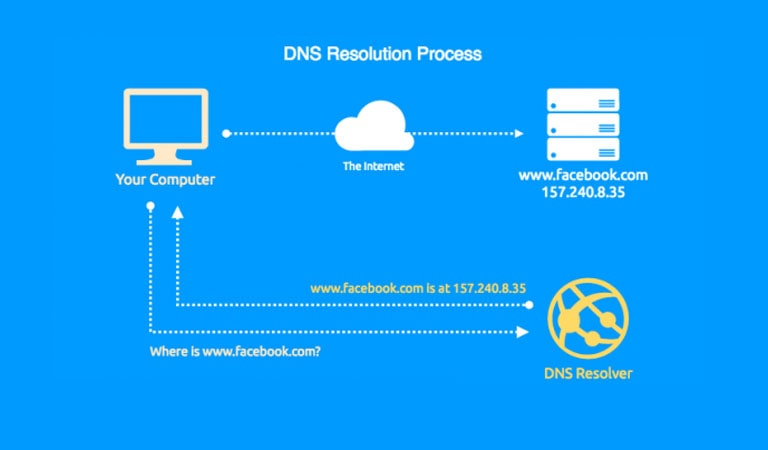
DNS resolver which is sometimes called DNS cache is a local server that works as a tool to search for DNS records. DNS resolver’s main job is to resolve each hostname to an IP address.
It stores DNS nameservers in a central database and answers to each DNS query from clients all around the world.
This service helps the system to find out how web pages are hosted on servers and also how each domain name is held up.
Now let’s see how does DNS work step by step with some detailed information about each process in order to show us what we are looking for.
How Does DNS Work In 7 Steps?
1- The Query
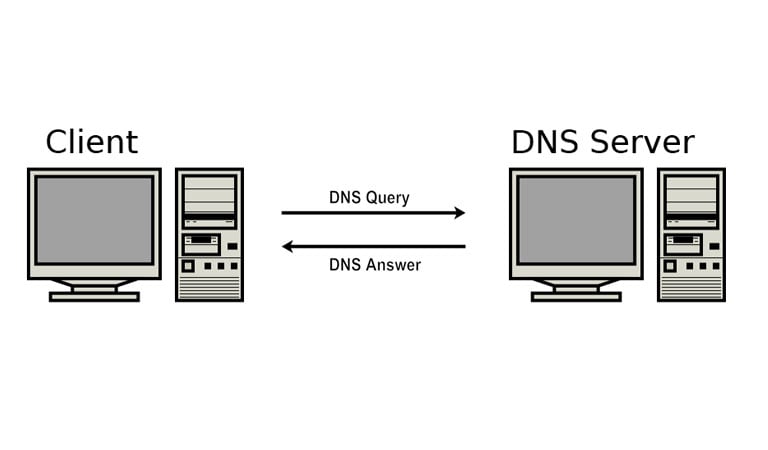
When you send your request for your intended domain name, your browser makes attempts to send a query and find the website which is connected to that domain name. This query will seek to find the domain name which matches the corresponding IP address.
There is a service that helps this progress to be done in the best way. The Recursive Resolver receives such queries from clients and searches to find the best result.
Many ISPs provide such service that will store the results of its searches in its memory and cache them for a dedicated time. This service knows all DNS servers and diagnoses which one is best to redirect the query for.
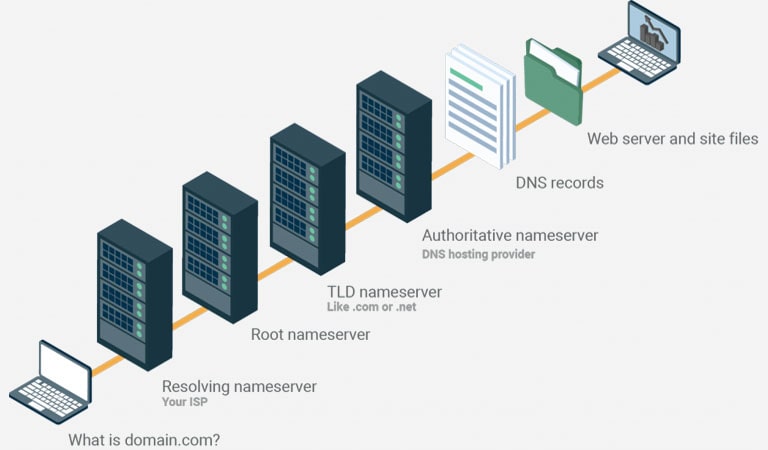
2- Recursive DNS Servers
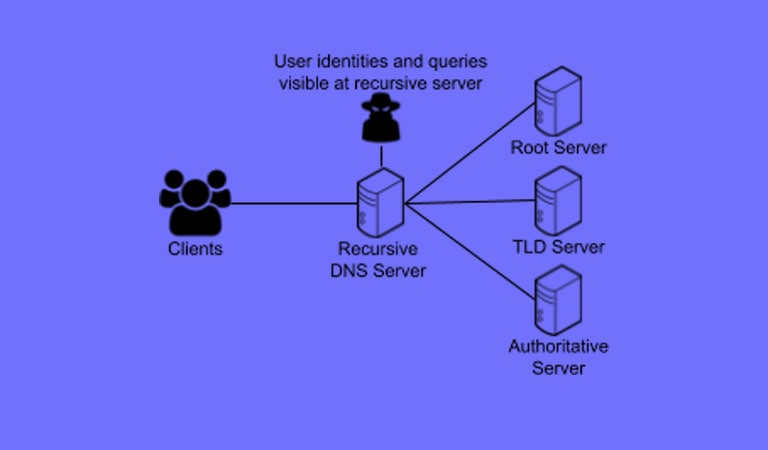
Recursive Resolver will make connections to various servers in order to receive the proper answer. The first station of translating clients’ searches to IP addresses is Recursive DNS Server. These Servers answer each query with the closest server to that client which helps to save more time.
3- Root Name Servers
If recursive name servers didn’t achieve any answers, root servers are the next target to receive that query. Each root server works like a computer that will answer to any query for IP addresses. But if they don’t know the proper answer, they will send these DNS queries to the servers that know the answer or even know where to find the answer.
4- TLD Server
The next step for searching each specific IP will occur within the TLD (Top Level Domain) server. There are many root servers around the world and know all DNS information about TLDs such as .com .org. The Recursive Resolver will ask its query from these root servers about such TLDs.
5- Authoritative Servers
Despite TLD servers, authoritative DNS servers check our request for the full version of the domain name and direct each query to the servers which have information about that specific domain name, which is stored in DNS records. Some of these authoritative servers reply to the best answer to each user who sends the request.
6- Retrieve and store the record
Now it’s time for the recursive server to retrieve the A record of a domain name from the target server and cache the records. This process will help each website to be loaded in no time. When any other users send their requests for the same domain name, the recursive server has the exact answer for them.
7- Displaying the website
This is the final step in which your computer will receive the A records and store them within its cache file. Recursive resolver tells the browser what the IP of each domain is. This helps your browser to send a request to a website to retrieve its content. Your computer will read each IP address from its record and pass it to your browser.
Now the browser is able to connect to the main web server and load the website content.
DNS nameserver as a vital member of the virtual world helps each web page to appear on our systems. Actually, DNS resolvers are important in our research through the Internet to make the contents transparent for clients.
Every web hosting service provides you a dedicated DNS record which makes your website appear when clients send their request for it. For example, after your WordPress website design, you need to buy a host that is suitable for it. A WordPress hosting service would be a better choice and will meet your needs in the best way. This WordPress hosting creates a connection between your website and clients and answers to their requests through DNS records.
In this article, we find out what is DNS and how DNS servers work. We should know that DNS helps users to see the company they are searching for is held by which trademarked brand. This leads clients to avoid internet scams and improve their searches.
Understanding the DNS Process in Detail
The Domain Name System (DNS) is the backbone of the internet, translating human-friendly domain names into IP addresses. Here’s how it works step-by-step:
- Step 1: DNS Query Initiation – When a user enters a URL in their browser, a DNS query is initiated to find the corresponding IP address.
- Step 2: Recursive DNS Resolver – The query is sent to a recursive DNS resolver which acts as a middleman between the user and the DNS system.
- Step 3: Root Name Server – The resolver contacts a root name server, which directs it to the appropriate top-level domain (TLD) server.
- Step 4: TLD Name Server – The TLD server provides the address of the authoritative DNS server for the domain.
- Step 5: Authoritative DNS Server – This server holds the DNS records and responds with the IP address of the requested domain.
- Step 6: DNS Caching – The resolver caches the IP address locally for future queries, speeding up the process.
- Step 7: Final Connection – The browser uses the IP address to connect to the web server and load the website.
DNS Caching and Its Impact
DNS caching plays a crucial role in reducing latency and improving load times. By storing DNS query results locally, subsequent requests for the same domain can be resolved quickly without needing to repeat the entire DNS lookup process. This efficiency is vital for maintaining optimal web performance.
Comparing DNS Services
| Feature | Google DNS | Cloudflare DNS | OpenDNS |
|---|---|---|---|
| Primary IP | 8.8.8.8 | 1.1.1.1 | 208.67.222.222 |
| Secondary IP | 8.8.4.4 | 1.0.0.1 | 208.67.220.220 |
| Privacy Features | Basic | Enhanced | Enhanced |
FAQ
What is a DNS query?
A DNS query is a request made by a user’s computer to a DNS server to resolve a domain name into an IP address. This is the first step in connecting to a website.
How can DNS affect website speed?
DNS affects website speed by determining how quickly a domain name is resolved to an IP address. Faster DNS resolution leads to quicker initial connections and overall improved site speed.
What are the benefits of using a third-party DNS service?
Third-party DNS services can offer enhanced performance, security, and privacy features compared to default ISP DNS servers. They often provide faster query resolution and advanced protection against threats.
For those looking to enhance their website’s performance, consider exploring our comprehensive hosting solutions that integrate seamlessly with advanced DNS configurations.
Understanding DNS Query Types
DNS queries are essential components of the DNS resolution process, determining how a DNS server responds to requests. Understanding these query types can enhance your ability to troubleshoot and optimize DNS performance. The three primary DNS query types are recursive, iterative, and non-recursive queries.
Recursive Queries: In a recursive query, the DNS client expects the DNS server to respond with either the requested resource record or an error message if the domain name cannot be resolved. This type of query places the burden on the DNS server to continue querying other DNS servers until a definitive answer is found.
Iterative Queries: An iterative query allows the DNS server to return the best answer it can provide without querying other servers. If the server does not have the requested record, it will return a referral to a different DNS server that might have the answer.
Non-Recursive Queries: Typically used when a DNS server already has the information cached, non-recursive queries allow the server to quickly return the requested record without further querying other servers. This type of query is efficient and reduces latency in DNS resolution.
DNS Caching and Its Impact
DNS caching is a critical feature that enhances the speed and efficiency of DNS resolution. By storing DNS query results locally, caching reduces the need to repeatedly query authoritative DNS servers, thus decreasing the time it takes to resolve domain names.
When a DNS query is made, the result is stored in the cache of the DNS client, the operating system, or the DNS server itself. This cached information is used to respond to subsequent queries for the same domain name, significantly speeding up the resolution process.
- Client-Side Caching: Most operating systems have a DNS cache that stores recent DNS query results. This cache can be viewed and cleared using system-specific commands, such as
ipconfig /displaydnsandipconfig /flushdnsin Windows. - Server-Side Caching: DNS servers also store query results to reduce load and improve response times. The Time to Live (TTL) value in DNS records determines how long a record is kept in the cache.
While caching improves performance, it can also lead to issues such as outdated information being served if DNS records change. Clearing the cache or adjusting TTL values can mitigate these issues.
Best Practices for DNS Configuration
Proper DNS configuration is vital for ensuring the reliability and performance of your network. Implementing best practices can help prevent common DNS issues and enhance the overall efficiency of your DNS infrastructure.
- Use Redundant DNS Servers: Having multiple DNS servers ensures that if one server fails, others can handle the DNS queries, providing reliability and uptime for your domain resolution.
- Regularly Update DNS Records: Keep your DNS records up-to-date to avoid resolution failures. This includes removing outdated records and ensuring that all necessary records are present and accurate.
- Implement DNS Security Extensions (DNSSEC): DNSSEC adds a layer of security by enabling DNS responses to be verified, preventing attacks such as DNS spoofing and cache poisoning.
- Monitor DNS Performance: Regular monitoring can help identify performance bottlenecks or security issues. Tools like DNS monitoring software can provide insights into query response times and server health.
Troubleshooting Common DNS Issues
DNS issues can cause significant disruptions, but understanding common problems and their solutions can help minimize downtime. Here are some frequent DNS issues and how to troubleshoot them:
- DNS Resolution Failures: This can occur due to incorrect DNS settings or server unavailability. Verify that DNS server addresses are correctly configured and that servers are operational.
- Cache Poisoning: This security threat involves corrupting the DNS cache with false information. Implement DNSSEC and regularly clear caches to prevent this issue.
- Slow DNS Queries: High latency in DNS queries can be caused by network congestion or overloaded servers. Use tools like
digornslookupto diagnose and resolve such issues.
By understanding these common issues and their solutions, you can ensure a more reliable and secure DNS infrastructure.

Behzad Nategh is the Founder and CEO of Rackset, with 20+ years in web hosting, cloud infrastructure, and web design. He writes on hosting, domains, security, and growing an online business.
Leave a Reply